



Note before buying
Does not support Android Auto and Android phones
Does not support YouTube and other software video playback
The function of this product is to convert the originalwired Carplay into wireless Carplay.For Carplay, it supports iPhone 6 and above models, and the software version is ios 10
Users can confirm whether the car supports carplay through the following methods:
1. In the settings menu of the vehicle system, look for “Mobile Internet”, “CarPlay”, “Smart Device Management” or similar options to confirm whether there are CarPlay related settings.
2. Connect your iPhone: Use the original Apple Lightning cable to connect your iPhone to your car’s USB port (usually the one with a phone icon or labeled “CarPlay”). If your car supports wireless CarPlay, you can enable wireless CarPlay in your iPhone’s settings and make sure your iPhone is paired with the car’s Bluetooth.
3. Check the car display: After connecting the iPhone, the Apple CarPlay prompt should pop up on the screen of the car infotainment system. If a prompt pops up, it means your car supports CarPlay.


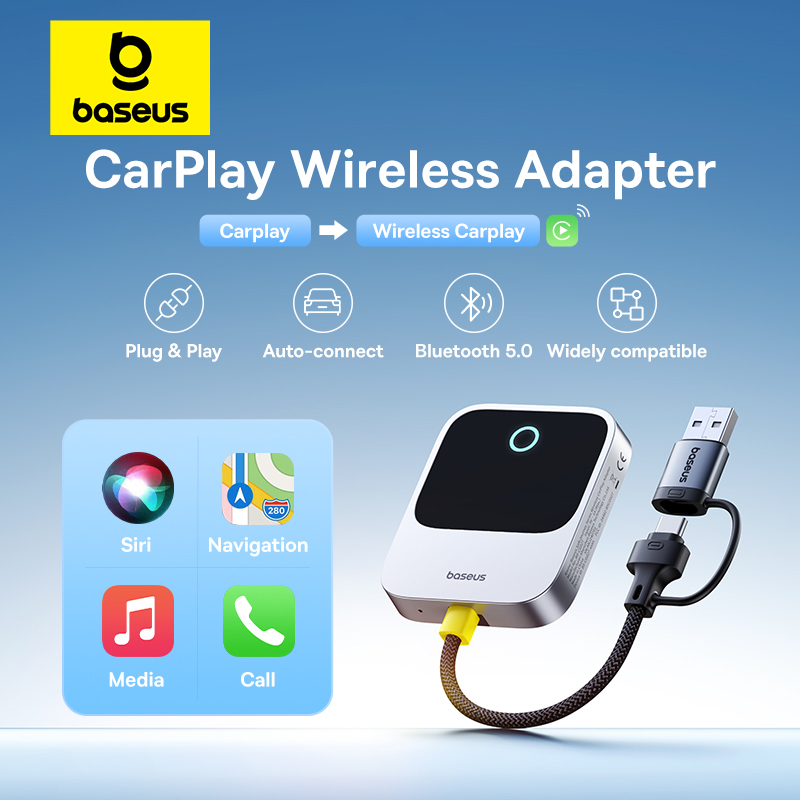
Use Apps and Services Right in to Your Car Effortlessly
*Only for Apple CarPlay, can’t be used as a video caster.

Plug & Play
Super easy set-up.
1.Plug the adapter into car USB port.
2.WFi / Bluetooth pairing.
3.Connect and access your apps.

In-Car Voice Control
Enhance your driving experience as well as increasingsafety along the way.

In-dash Navigation
Ideal for car on road trips, ensuring undistracted and safe drive.

Easily Access Apps Using the Car’s Display
Stay in sync from phone screen to infotainment touchscreen.

Enjoy Music Hands-free On the Go
Fill your car with your favourite songs in a cinch.

Much Faster and More Stable Connection
Supported by a Bluetooth 5.0 chip.


Seamless Auto-connect
Instantly pair with your phone whenever you start your car

USB-C to USB-A Adapter Cable Included
Widely compatible

Instructions for Use
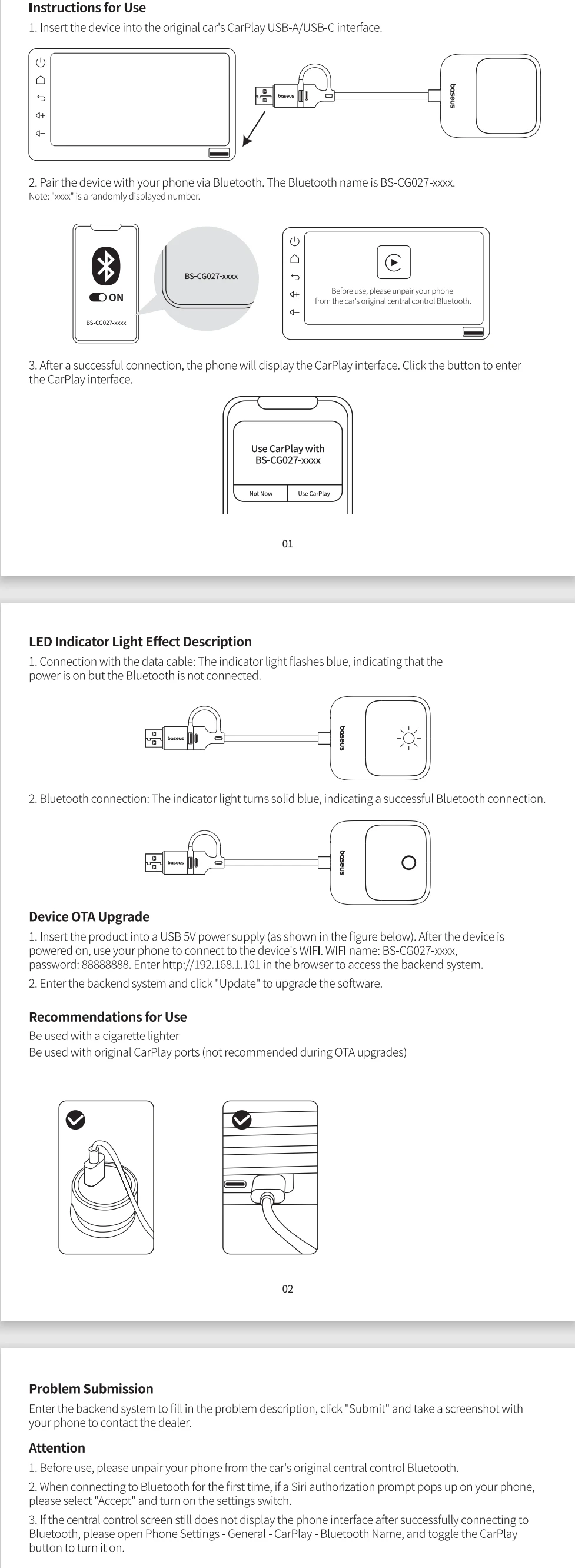
1. Insert the device into the original car’s CarPlay USB-A/USB-C interface.
2. Pair the device with your phone via Bluetooth. The Bluetooth name is BS-CG027-xxxx.
Note: “xxxx” is a randomly displayed number.
3. After a successful connection, the phone will display the CarPlay interface. Click the button to enterthe CarPlay interface.
LED Indicator Light Effect Description
1. Connection with the data cable: The indicator light flashes blue, indicating that thepower is on but the Bluetooth is not connected.
2. Bluetooth connection: The indicator light turns solid blue, indicating a successful Bluetooth connection.
Device OTA Upgrade
1. insert the product into a USB 5V power supply (as shown in the figure below). After the device ispowered on, use your phone to connect to the device’s WlFl. WlFl name: BS-CG027-xxxx,password:88888888. Enter //192.168.1.101 in the browser to access the backend system.2. Enter the backend system and click “Update” to upgrade the software.
Recommendations for Use
Be used with a cigarette lighterBe used with original CarPlay ports (not recommended during OTA upgrades)
Problem Submission
Enter the backend system to fil in the problem description, click “Submit” and take a screenshot withyour phone to contact the dealer.
Attention
1. Before use, please unpair your phone from the car’s original central control Bluetooth.
2. When connecting to Bluetooth for the first time, if a Siri authorization prompt pops up on your phone,please select “Accept” and turn on the settings switch.
3. lf the central control screen still does not display the phone interface after successfully connecting toBluetooth, please open Phone Settings – General – CarPlay – Bluetooth Name, and toggle the CarPlaybutton to turn it on.





Super easy installation, a very well-made product just like all Baseus products! I recommend it!!
Works very well! Just turn on the multimedia system and connect the phone's Bluetooth, and you're done!
I got it.
I am satisfied with the fast delivery and good quality. I am satisfied with the fast delivery and good quality. I am satisfied with the fast delivery and good quality. I am satisfied with the fast delivery and good quality. I am satisfied with the fast delivery and good quality.
Works great, perfect, fast shipping, easy to use.
The packaging is crushed, but everything inside is intact. I'm not talking about the quality because it's Baseus. Connected instantly, works fine. Thanks to the seller, I recommend it.
Top quality product, fast connection.
Excellent device. Tested and it doesn't freeze. Good performance and fluidity. Music and maps at the same time without lag. I truly recommend it to those looking for a good wireless CarPlay experience. The only thing to improve is the rubber it comes with to stick to the surface, which isn't very good, so it should be replaced with another one.
I don't know about other inconveniences, but first of all, the connection time is slower than expected (loading time is quite long). When I'm talking outside and open the car door to go inside, it connects even though I haven't started the car, so I can't hear the call. The important thing is that even when trying to make a call with my phone, it keeps automatically connecting and I have to block CarPlay access. That's why I returned it lol. The sound quality and response speed are better than those priced at ten thousand won.
I am buying this device for the second time; my friend asked for it for his car after seeing it in mine. The product is of good quality and works fine in my Volvo XC90. I recommend the seller.
Product arrived quickly. Not tested yet.
Fast delivery. The product matches the description. Bought for Volvo, when connected, almost all functions work as before, but for some reason Waze doesn't select the destination yet, it broadcasts on both car screens, as soon as you choose the route, it broadcasts only on the multimedia screen and not on the dashboard screen. Connection is very simple and after the first time connecting on the phone, it connects automatically.
There is no problem with the connection, but there is a delay compared to wired.
100% recommended in my case it's a Suzuki SCross, which is quite complicated to do and on the first Bluetooth connection my phone was configured on the tablet much more comfortably and practically. 💯 💯 💯 💯 💯 💯
Very good product.
So far it works correctly, without any communication complications between the device and the radio, the connection is almost instant, tested on RCD440 pro radio, Baseus never disappoints, worth its price 100% recommended.
Good quality and great price. The delivery was relatively fast. I did not communicate with the seller. Let's see how it will be in use.
It seems works good. Several times observed loss of connection, but maybe in the beginning only.
The product arrived very quickly, earlier than it was in the description. The connection took a minute. Works smoothly.